Effective Program Review – Two Tales of The Same Story

A program review involves assessing the success and effectiveness of a program based on its ability to deliver value to stakeholders. Whether the program is related to business initiatives, technology innovation, or any other type of effort, the review should focus on understanding how well the program aligns with its objectives and if it has achieved its intended outcomes.

There are two distinct dimensions of program review. It is where latitude and longitude intersect at a given interest point. It is important for the reviewers to understand the purpose of metrics.

Dimension longitude: Character pillars, functional areas of a program.

Using the AWS Well-Architected Review (WAR) framework, you can create a six-pillar review category, each representing an essential part of cloud computing. Within each pillar, you can further review the execution of your program and give a quantitative rating of scores. A sample review result will look like this:

Dimension latitude: execution pillars, execution areas of a program.

You can also perform, visualize, and/or summarize the same review from another lens. This one, from execution perspective. We will examine the execution from areas of: understanding, plan and preparation, implementation, quality of work, resource management, and values returned to customer. The advantage of execution perspective is to focus on how the work is organized, carried out, and concluded. Therefore, lessons learned and best practices are more actionable for future. An effective management will make work more repeatable, consistent, and quantitatively measurable.

With further customization and careful consideration, this framework can assist organizations in creating helpful reviews, data-driven insights, and actionable follow-ups. For more information, please don’t hesitate to contact me.
Architecture Characters: Now and Then

Architecture refers to various domains such as building architecture, software architecture, system architecture, or even organizational architecture. Each domain has its specific components and considerations. They all share some common elements such as:

  1. Components: These are the fundamental building blocks of the architecture. In building architecture, they can include walls, floors, roofs, doors, windows, etc. In software architecture, components refer to the modular parts of a software system, such as modules, classes, libraries, or services.
  2. Structure: The structure defines the arrangement and organization of components and their relationships. In building architecture, it involves the spatial arrangement of rooms, corridors, and other physical elements. In software architecture, it represents the organization of components, layers, subsystems, or modules and the connections between them.
  3. Patterns and Styles: These refer to established solutions or design paradigms used to address common architectural challenges. Examples include architectural styles like Gothic or Modernist in building architecture, or architectural patterns like MVC (Model-View-Controller) or Microservices in software architecture.
  4. Interfaces and Interactions: These describe how components or subsystems interact with each other. In building architecture, interfaces include doors, windows, and passages, allowing people to move between spaces. In software architecture, interfaces define the methods, protocols, or APIs through which software components communicate and exchange data.
  5. Constraints and Requirements: Architecture is influenced by various constraints and requirements, such as functional requirements, performance goals, scalability, security, regulatory compliance, and user needs. These constraints shape the design decisions and influence the overall architecture.
  6. Technology and Tools: Architecture often involves the selection and integration of specific technologies, tools, or platforms. In building architecture, it can involve choosing construction materials, building systems, or energy-efficient solutions. In software architecture, it includes decisions on programming languages, frameworks, databases, or cloud platforms.
  7. Aesthetics and Experience: In building architecture, aesthetics play a significant role in creating visually pleasing and harmonious designs. It considers factors such as form, proportion, color, texture, and the overall experience of occupants. In software architecture, user experience (UX) design focuses on creating intuitive, efficient, and satisfying interactions with the software system.
  8. Performance and Optimization: Architecture must consider performance and optimization aspects. In building architecture, it involves considerations like energy efficiency, ventilation, insulation, and structural stability. In software architecture, it includes designing for optimal response times, scalability, resource utilization, and minimizing bottlenecks.
  9. Documentation and Communication: Architecture needs to be effectively communicated and documented to stakeholders, including clients, users, developers, and other involved parties. This documentation can include diagrams, blueprints, specifications, guidelines, and other artifacts that convey the design intent and facilitate implementation.
  10. Evolution and Adaptation: Architecture should be adaptable to accommodate changes and future growth. It should be flexible enough to incorporate new technologies, requirements, or functionalities over time. Consideration of scalability, modularity, and extensibility helps ensure the architecture’s longevity.

It’s important to note that the specific components and considerations can vary depending on the domain and context, as the term “architecture” is used.

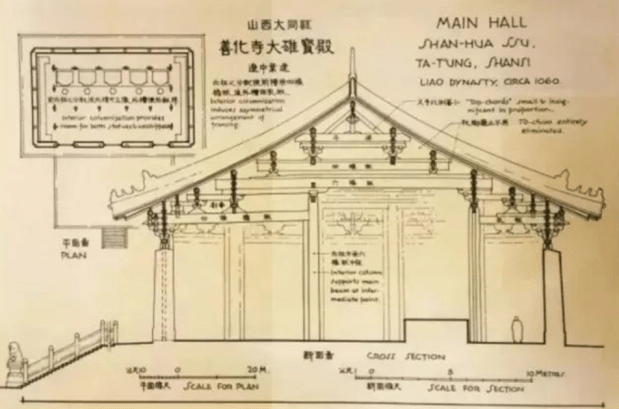
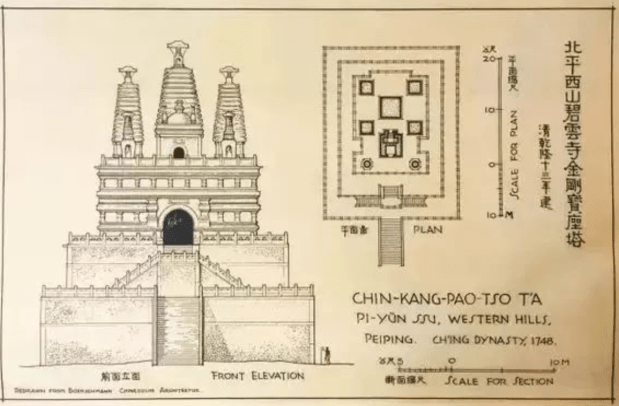
In this gallery, you can browse a few valuable examples from Liang Sicheng, a Chinese architect and architectural historian, known as the father of modern Chinese architecture. His drawings on historical landmarks are at the highest standard, with finest details, from almost 100 years ago.

The design of a team logo

In today’s digital world, Information Technology (IT) teams play a crucial role in the success of businesses and organizations. Whether they are developing software, managing networks, or maintaining cloud infrastructure, IT teams are essential for keeping things running smoothly. With the increasing trend of remote and geo-dispersed teams, many organizations are recognizing the need for a team logo to represent their mission and central workforce. In this blog post, I will share why we creating a team logo is important.

  1. Branding and identity

A team logo is a visual representation of your team, and it can help establish your team’s identity and brand. Having a logo can help your team stand out and create a unique identity, which can be especially important in a competitive market. A logo can also help with team cohesion and pride, as team members can feel a sense of belonging and identity when they see their team’s logo.

  1. Professionalism

A well-designed logo can add a level of professionalism to your team. It shows that your team is serious and dedicated to its work. A professional logo can also help establish credibility and trust with clients and stakeholders. In addition, a logo can help your team look more organized and put-together, which can be important when working with other departments or teams.

  1. Recognition

A team logo can also help with recognition and visibility. It can make it easier for clients and stakeholders to identify your team and its work. This can be especially important if your team is working on a project that involves multiple teams or departments. A logo can also help with marketing and promotion, as it can be used on promotional materials or in presentations.

  1. Motivation and morale

Having a team logo can also help with motivation and morale. It can give team members a sense of pride and ownership in their work, which can lead to increased motivation and productivity. A logo can also help with team cohesion, as team members can feel more connected to each other and to the team as a whole.

A team logo can provide numerous benefits to an IT team. It can help with branding and identity, add a level of professionalism, aid with recognition, and boost motivation and morale. With so many advantages, it’s clear that having a team logo for your IT team is a smart investment. So if your team doesn’t have a logo yet, it may be time to start designing one!

My blog Logo with highlights:

  • Both 2D and 3D feel
  • CodePen theme
  • Message of simplicity
  • Balanced and centered
A sample logo

A Sample Logo with highlights:

  • Network as main theme
  • 9 different sub areas
  • High contrast design
  • Ideal for icons

Do you need a logo, a trademark, or a digital landmark to motivate your team?

One-Time
Monthly
Yearly

Make a one-time donation

Make a monthly donation

Make a yearly donation

Choose an amount

¤15.00
¤50.00
¤100.00
¤5.00
¤15.00
¤100.00
¤5.00
¤15.00
¤100.00

Or enter a custom amount

¤

Your contribution is appreciated.

Your contribution is appreciated.

Your contribution is appreciated.

DonateDonate monthlyDonate yearly

Mission Statement and The Build of A Program

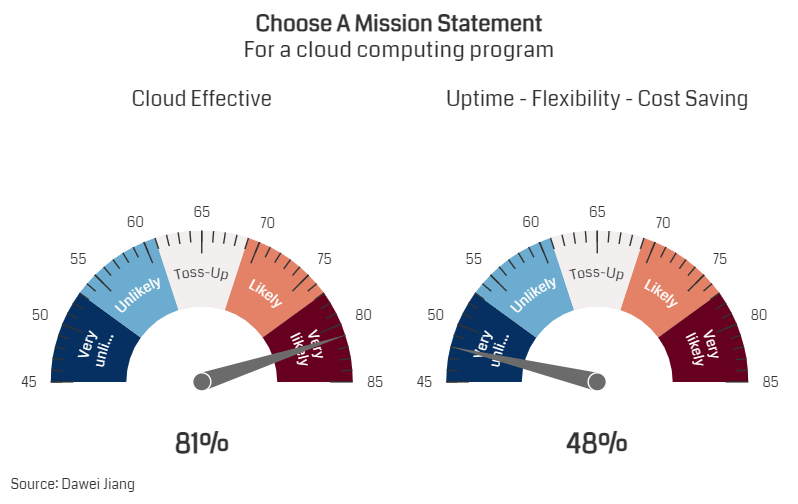
Choosing a mission statement is an important step in defining the purpose and direction of your organization or business. To create an effective mission statement, start by considering the core values and principles that drive your program’s decision-making and actions. It should reflect these values and communicate your organization’s purpose in a clear and concise way. It’s also important to think about your target audience and the specific needs and desires that your organization aims to address. The mission statement should speak directly to your audience and inspire them to connect with your brand. Finally, make sure your mission statement is memorable and authentic. It should accurately reflect your organization’s identity and be something that both employees and customers can rally behind.

The featured picture is how we choose our mission statement.

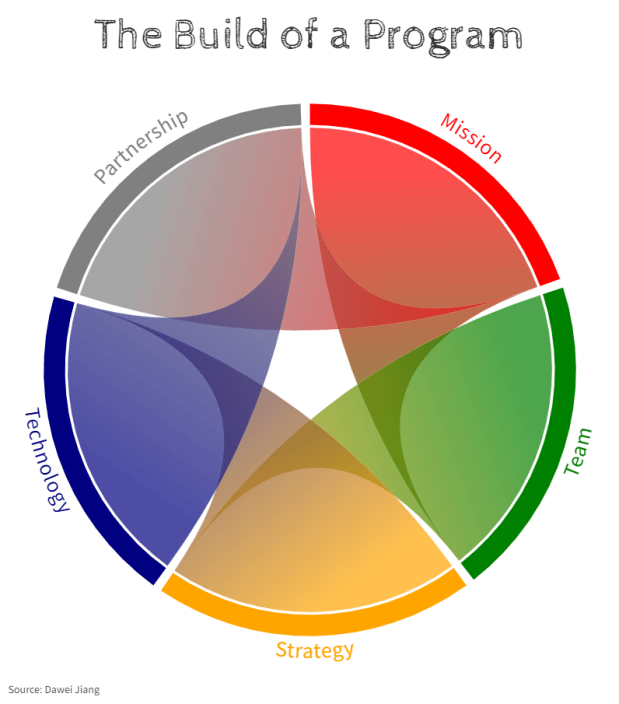
The following describes how to build a technology program. For a program, mission comes first. And for a mission, mission statement comes first.

Building a technology program can be a complex task, but it’s an essential one for organizations that want to stay ahead of the curve and take advantage of the latest technologies. A successful technology program requires careful planning and execution across five key areas: mission, team, strategy, technology, and partnership.

  1. Mission

The first step in building a technology program is to define its mission. This involves identifying the goals and objectives of the program, as well as the target audience and expected outcomes. A clear and concise mission statement will help guide the program’s development and ensure that everyone involved is on the same page.

  1. Team

The success of any technology program depends on having the right team in place. This includes not only technical experts but also business leaders and project managers who can help align the program with the organization’s overall strategy. It’s important to identify the key roles and responsibilities needed to execute the program and to recruit the best talent to fill them.

  1. Strategy

A solid strategy is essential to building a successful technology program. This includes developing a roadmap that outlines the program’s goals, timelines, and key milestones. It’s also important to identify potential risks and challenges that may arise during the program’s execution and to develop contingency plans to address them.

  1. Technology

The technology itself is, of course, a crucial aspect of any technology program. This includes identifying the right hardware, software, and infrastructure needed to support the program’s objectives. It’s also important to stay up to date with the latest technologies and trends and to continually evaluate and improve the program’s technology stack.

  1. Partnership

Finally, building a successful technology program requires building strong partnerships with vendors, suppliers, and other stakeholders. This includes working closely with technology providers to identify the best solutions and negotiate favorable terms. It also involves collaborating with other departments within the organization to ensure that the program aligns with the overall strategy and meets the needs of all stakeholders.

Building a technology program requires careful planning and execution across multiple areas. By focusing on the mission, team, strategy, technology, and partnership, organizations can create a program that delivers real value and drives innovation. By following these five steps, you can be well on your way to building a successful technology program that helps your organization achieve its goals.

Prioritize goals of cloud computing

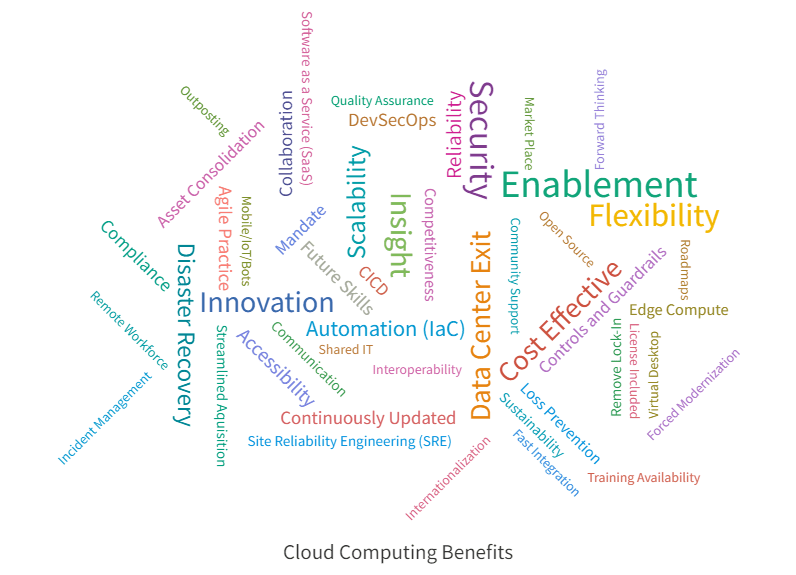
In my recent public speaking event, I talked about cloud computing benefits. This visualization lists 52 benefit areas, where I will discuss each of them in a series of blog posts in the coming months.

In the meanwhile, this is the general conception of cloud computing benefits:

Cloud computing has revolutionized the way businesses operate, offering a range of benefits that were once unimaginable. Whether you’re a small startup or a large enterprise, there are numerous advantages to using cloud computing services. In this blog post, we’ll explore the top 10 benefits of cloud computing.

Cost savings
One of the most significant benefits of cloud computing is cost savings. By using cloud-based services, businesses can reduce their IT infrastructure costs, including hardware, software, and maintenance. They can also scale their resources up or down as needed, paying only for what they use.

Flexibility
Cloud computing offers unprecedented flexibility, allowing businesses to access resources and services from anywhere in the world. This means that employees can work from anywhere, on any device, and still have access to the same applications and data.

Scalability
Cloud computing allows businesses to quickly and easily scale their resources up or down as needed. This means that businesses can quickly adapt to changing market conditions or sudden spikes in demand without having to invest in additional hardware or software.

Security
Cloud computing providers invest heavily in security measures to protect their customers’ data. This includes physical security, data encryption, and access controls, making it more secure than traditional IT infrastructure.

Disaster recovery
Cloud computing offers reliable disaster recovery options, allowing businesses to quickly and easily recover their data and applications in the event of a disaster. This means that businesses can minimize downtime and maintain business continuity, even in the face of unexpected events.

Increased collaboration
Cloud computing enables easy collaboration between employees, regardless of their location. This means that teams can work together seamlessly, sharing data and information in real-time.

Environmentally friendly
Cloud computing is environmentally friendly, as it reduces the need for on-site hardware and data centers. This means that businesses can reduce their carbon footprint and contribute to a more sustainable future.

Automatic software updates
Cloud computing providers typically handle software updates and maintenance, freeing businesses from the burden of keeping their systems up to date. This means that businesses can focus on their core activities, rather than worrying about IT infrastructure.

Increased competitiveness
Cloud computing can give businesses a competitive edge by enabling them to access the latest technologies and services quickly and easily. This means that businesses can respond quickly to changing market conditions and stay ahead of the competition.

Access to big data
Cloud computing provides businesses with access to big data analytics and processing tools, enabling them to extract insights and make informed decisions. This means that businesses can better understand their customers, products, and market trends, allowing them to optimize their operations and increase their bottom line.

In conclusion, cloud computing offers numerous benefits to businesses of all sizes, including cost savings, flexibility, scalability, security, disaster recovery, collaboration, environmental friendliness, automatic software updates, increased competitiveness, and access to big data. By leveraging these benefits, businesses can optimize their operations, increase their efficiency, and stay ahead of the competition.

Goal setting is the very first step of a cloud journey!

One-Time
Monthly
Yearly

Make a one-time donation

Make a monthly donation

Make a yearly donation

Choose an amount

¤5.00
¤15.00
¤100.00
¤5.00
¤15.00
¤100.00
¤5.00
¤15.00
¤100.00

Or enter a custom amount

¤

Your contribution is appreciated.

Your contribution is appreciated.

Your contribution is appreciated.

DonateDonate monthlyDonate yearly

Data Visualization Example

Data Visualization

What it is?

Data visualization is the process of taking data and transforming it into graphical representations such as charts, graphs, and maps. It is used to communicate information effectively and quickly to a wide audience. Data visualization helps to identify patterns, trends, and correlations in data that may not be easily identified from looking at a raw dataset. By using data visualization tools, data can be transformed into visually appealing and informative visuals that can be used for data exploration and for presenting data-driven insights.

Data visualization is a powerful tool for communicating information. By displaying data in graphical form, it can help to quickly identify patterns, trends, and correlations that may not be immediately apparent in raw data. It can also help to identify outliers and anomalies in data that could indicate important changes or areas of focus. Additionally, data visualization can help to make data more accessible and easier to understand, which can help to facilitate better decision-making and increase engagement with data.

Data Visualization

How it is made?

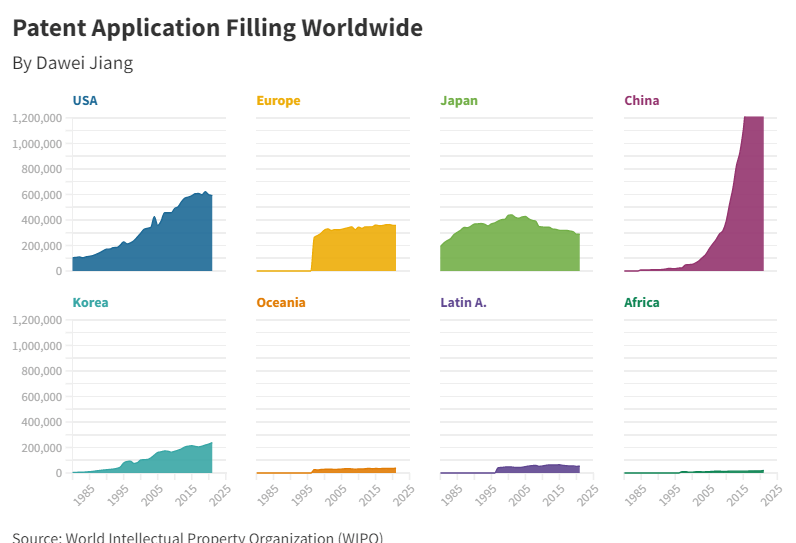
Data comes to us in a simple way. Below is a snapshot of a downloaded dataset from World Intellectual Property Organization (WIPO).

When we ask how many patents were filed in the United States in 1998, the answer is contextually related to the number we seek. When we ask how many patents each major global office received in the same year, we get a row in a relational table. More data aggregates as this relational table grows and expands. It gets more informative.

Next, I will show a few variations of visualization of the same set of data as above, as well as a live demonstration of how it can be displayed dynamically.

This is called grid view. By separating 8 entities on a timeline and scale, the aggregational information of the data can be extracted.

This is an improved grid view. It has two scales and can be used to highlight the main focus entity, in this case, the United States, which is presented in line format.

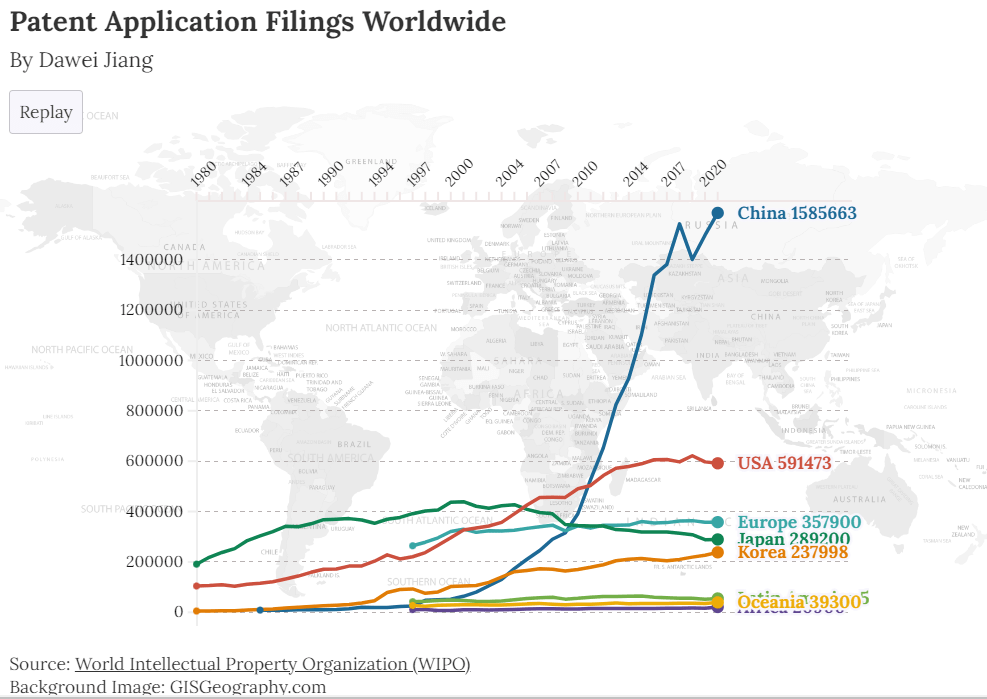
Plot the lines together, you get this. This graph helps viewers to see the growth and comparison in a more visual way.

This is for the ultimate visualization. The data is now dynamically displayed, with fine touches and fine details. You can view the story at: https://public.flourish.studio/story/1793664/

In my LinkedIn post, I stated that if data is gold, data visualization is goldsmithing. It transforms useful materials into beautiful artifacts.

Securing internet bound cloud workloads

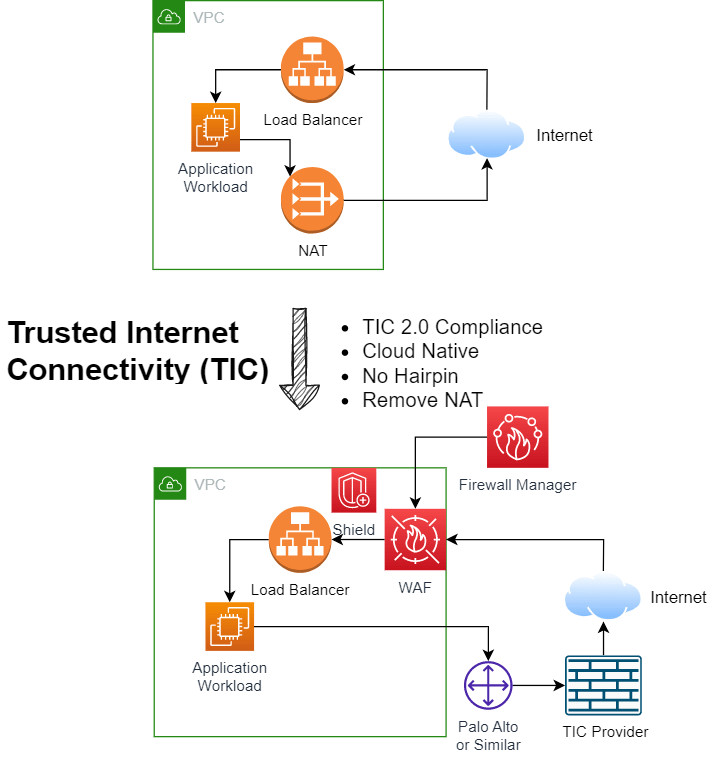
Is the upper diagram close to what you have today? consider a change.

This design illustrates how to secure cloud workload, achieve compliance, without sacrificing performance and cost. Many industries are mandated by specific trusted internet connectivity (TIC) requirement. Some overhauls the network traffic to on premise (Hairpin), which loses the benefit of using cloud.

The top picture is what one’s recreational cloud use look like, and some early stage adopters might have similar implementation. The bottom picture is what you supposed to be, in a secured and compliance way.

This work is crucial for cloud security. It is:

  • From non-compliance to compliance
  • From “open to be attacked” to “open to business in a secured way”
  • From NO TIC to TIC 2.0, heading to TIC 3.0.
  • From an early establishment of cloud to enterprise cloud
  • From “I don’t know” to “you can’t hide”
  • Improvement in all paradigms: cloud native (operation), no hairpin (performance), remove NAT (cost reduction), compliance (cyber)

Viva craftsmanship!

Interview question 2023

Check this video out. It has a very nice explanation of this particular math problem, and with a python code example of a general solution? It is well elaborated with great details.

What I am blogging about is a methodology being applied in this example. Figuring out and separating out that common factor to reduce your size of challenge. I mentioned this in a few early posts on math challenges.

This is a shared best practice on math, on SLA and troubleshooting, on building a complex solution. It is simple and powerful.